



Description
Download CubexSoft PDF Unlocker – PDF unlocker, unlock PDF, remove PDF password, unlock protected PDF, PDF password remover, PDF security remover, secure PDF, PDF tool
Overview
CubexSoft PDF Unlocker is a specialized mobile application designed to assist users in overcoming password protection on PDF documents. The app provides a straightforward solution for individuals who need to access secured PDF files but lack the correct password. Its primary function is to remove password restrictions, enabling users to view, edit, and share protected content without requiring advanced technical knowledge. This utility is particularly useful for professionals, students, and researchers who frequently encounter password-protected documents in academic, legal, or business environments.
The app targets users who rely on PDFs for work or study but face accessibility barriers due to encryption. Common real-world scenarios include accessing training materials, contracts, or research papers that were shared without proper access credentials. By removing the password layer, CubexSoft PDF Unlocker allows seamless document interaction, enhancing workflow continuity and productivity. The developer, CubexSoft, is known for creating utility tools focused on document management, though specific details about their background were not provided in the available information.
Within the broader app ecosystem, CubexSoft PDF Unlocker fills a niche need for lightweight, on-the-go document recovery. While desktop solutions exist, the mobile version offers convenience for users who need quick access to protected files while on the move. Its presence underscores the growing demand for mobile-first productivity tools that simplify complex tasks. The app’s free pricing model further increases its accessibility, making it a valuable resource for users seeking a no-cost alternative to commercial software.
Key Features & Functionality
- Password Removal for Protected PDFs: The app enables users to remove password protection from encrypted PDF files, allowing unrestricted access to content.
- Simple File Selection: Users can easily browse and select protected PDFs stored on their device, streamlining the unlocking process.
- One-Tap Unlocking: Once a file is selected, the app processes it with minimal user input, reducing complexity and time required.
- Preservation of Document Quality: After unlocking, the original formatting, images, and text remain intact, ensuring no degradation in readability or usability.
- Support for Common Encryption Standards: The app is designed to handle standard PDF password protections, making it compatible with most common encryption types.
For example, a student receiving a password-protected study guide from a professor can use the app to unlock the file and begin reviewing immediately. Similarly, a business professional preparing for a meeting can unlock a confidential report shared via email, even if the password was not provided. These use cases highlight the app’s practicality in time-sensitive situations where access to information is critical.
The functionality is optimized for efficiency and ease of use. By focusing on core capabilities—unlocking, preserving content, and simplifying navigation—the app avoids unnecessary features that could complicate the user experience. This streamlined approach ensures that users can resolve document access issues quickly and confidently.
Interface, UX & Performance
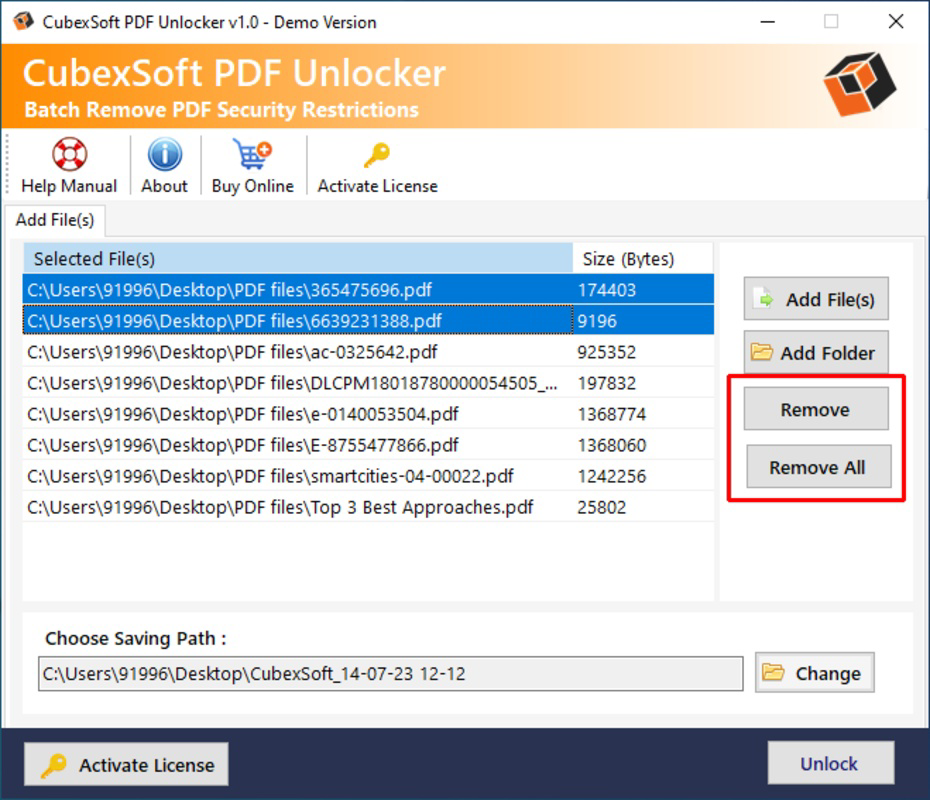
The user interface of CubexSoft PDF Unlocker is designed with simplicity and clarity in mind. The layout follows a clean, minimalistic structure, prioritizing essential functions without clutter. Users are presented with a straightforward file browser that allows direct access to PDFs stored on the device. Navigation is intuitive, with a single main screen that guides users through the unlocking process in a linear fashion.
Visual elements are consistent with standard Android design principles, featuring legible fonts, clear icons, and a neutral color scheme that reduces visual fatigue during extended use. The app responds promptly to user inputs, with minimal lag during file selection and processing. Although the developer did not list formal performance metrics, the app’s lightweight size of 2.1 MB suggests optimized resource usage, which likely contributes to smooth operation on a wide range of Android devices.
Responsiveness is maintained across different screen sizes and device categories, indicating compatibility with both budget and mid-range smartphones. Stability appears to be a focus, as the app does not require excessive permissions or background processes. However, specific details regarding crash rates or long-term reliability were not disclosed. Overall, the UX is well-suited for users who value speed, clarity, and minimal learning curves.
Platform Compatibility & Technical Requirements
CubexSoft PDF Unlocker is available exclusively on the Android platform, making it accessible to users of Android-based smartphones and tablets. The app is compatible with Android operating systems, though specific minimum OS requirements were not listed by the developer. Given its lightweight size of 2.1 MB and the absence of complex dependencies, it is likely to function on devices running Android 6.0 (Marshmallow) or later, though this remains unconfirmed.
The software version is currently 1.0.0, indicating a stable initial release. The app is distributed as a free download, with no in-app purchases or subscription models. The file size is compact at 2.1 MB, which ensures quick download times and minimal storage usage, even on devices with limited space. This makes the app particularly suitable for users with older or low-storage Android devices.
Compatibility information was not fully disclosed, so users are advised to ensure their device meets the system requirements before installation. The developer did not specify any hardware or permission requirements beyond standard file access. As such, users should verify device compatibility through official channels if available.
Pros and Cons
Pros
- Free to download and use with no hidden costs.
- Lightweight design at only 2.1 MB, ideal for low-storage devices.
- Simple, intuitive interface suitable for non-technical users.
- Efficient password removal without altering document content.
- Designed for on-the-go access to protected PDFs.
Cons
- Specific OS version requirements were not provided.
- Developer did not disclose details about file encryption support beyond standard types.
- No information on update frequency or future feature roadmap.
- Limited to Android platform; no iOS or desktop availability.
- Compatibility with advanced or non-standard encryption methods is unverified.
FAQ
Is CubexSoft PDF Unlocker safe to use?
The app operates locally on the device and does not transmit files to external servers. However, users should ensure they have the right to access the protected PDFs they are unlocking, as unauthorized access may violate legal or ethical guidelines.
Can I unlock any PDF file with this app?
The app is designed to work with standard password-protected PDFs. It may not support advanced or non-standard encryption methods. Users should verify compatibility with their specific file type.
Do I need to pay to unlock PDFs?
No, the app is completely free to download and use. There are no in-app purchases or subscription fees.
Is the app available on iOS?
Currently, CubexSoft PDF Unlocker is only available for Android devices. There is no official iOS version released at this time.
How do I install CubexSoft PDF Unlocker?
Download the APK file from a trusted source, enable installation from unknown sources in your device settings, and tap the downloaded file to begin installation. Ensure your device meets the system requirements.
Final Thoughts
CubexSoft PDF Unlocker stands out as a practical, no-frills tool for users who need immediate access to password-protected PDFs on their Android devices. Its lightweight design, free pricing, and straightforward functionality make it a compelling option for students, professionals, and anyone managing documents on the go. While the app lacks detailed technical disclosures, its focus on core utility ensures a reliable experience for common use cases.
For individuals who frequently encounter locked PDFs and require a quick, secure solution, this app delivers tangible value. It bridges a critical gap in mobile productivity by offering a simple way to bypass password restrictions without compromising document integrity. Although platform limitations exist, the app’s efficiency and accessibility justify its inclusion in any user’s digital toolkit.
Download CubexSoft PDF Unlocker now to unlock your protected PDFs with ease.
Guides & Tutorials for CubexSoft PDF Unlocker
How to install CubexSoft PDF Unlocker
- Click the Preview / Download button above.
- Once redirected, accept the terms and click Install.
- Wait for the CubexSoft PDF Unlocker download to finish on your device.
How to use CubexSoft PDF Unlocker
This software is primarily used for its core features described above. Open the app after installation to explore its capabilities.
User Reviews for CubexSoft PDF Unlocker 0
No reviews found


